Frequently
Asked Questions
Can't find what you're looking for? Reach us at

info@strydeup.com
Getting Started

StrydeUp is an AI-powered equestrian performance platform. Upload a pre-recorded riding video and our advanced AI will analyse your horse's movement — covering stride patterns, jump analytics, turn performance, balance, lead changes, and more. You'll receive tailored analytics aimed at incrementally improving horse and rider performance over time.
Tap Create Account on the sign-in screen, choose a subscription plan, fill in your details (name, email, phone number, address, and role), then verify your email address with the 6-digit code we send you. The whole process takes under two minutes.
When signing up, you can select: Rider, Trainer, Veterinarian, Horse Owner, or Enterprise Admin. Your role determines what features, horses, and users you have access to within the platform. You can hold multiple roles across different enterprises — for example, you might be a Rider on your individual account and a Trainer within an enterprise.
Check your spam or junk folder first. If it's not there, tap Resend on the verification screen. If you still haven't received it after 60 seconds, contact us at info@strydeup.com.
Yes. You can accept invitations from multiple enterprise accounts and hold different roles within each. You'll see all of your roles listed under My Roles in your profile.
Subscription Plan
StrydeUp has three plans: Premium, Pro, and Enterprise. Premium is designed for amateur riders with one horse, Pro is for professional riders managing multiple horses, and Enterprise is for organisations managing teams of riders, trainers, vets, and owners under one account.
Premium is perfect for amateur riders looking to improve their performance. It gives you everything you need to start analysing video footage using AI.
Advanced AI analytics
Add one horse
Unlimited video uploads
Trend analysis
Can i try Premium before committing? Yes — Premium comes with a free 7-day trial so you can explore the platform before being charged.
Pro is designed for professional riders competing at the highest level who need to manage multiple horses and are part of a wider team.
What does Pro Include?
Advanced AI analytics
Add multiple horses
Sync up to 4 users
Multiple video uploads per horse
Can i try Premium before committing? Yes — Pro comes with a free 7-day trial so you can explore the platform before being charged.
Enterprise is built for equestrian organisations — stables, training academies, or competitive yards — that need centralised management of multiple users and horses under one account.
Advanced AI analytics
Up to 25 internal users
Unlimited horses
Centralized billing
Each user has Pro-level functionality
Do Enterprise users get Pro features?
Yes. Every user added to an Enterprise account is automatically granted Pro-level functionality at no extra cost per user.
Yes. You can switch between monthly and 6-month billing from the My Subscription screen in your profile. Choosing 6-month billing saves you 15%.
Go to My Profile → My Subscription → Cancel Subscription. Please note that cancelling an Enterprise subscription will remove access for all associated users and horses. Subscriptions auto-renew until cancelled in your App Store settings.
Go to My Profile → My Subscription → Manage Subscription and select the plan you'd like to upgrade to.
Uploading & Analysing Video
We accept MP4 and MOV files up to 500 MB. For best results, upload HD (1920x1080) at 60fps, film from a slightly elevated angle, and keep one horse clearly centred in the frame.
Processing time varies depending on video length. A 2-minute video should process in approximately 5 minutes. You can navigate away and return when it's complete — a notification will appear when processing is finished.
Yes. When adding a session you can record: discipline, class height, course type, ground quality, ground type, weather conditions, whether the session was indoors or outdoors, and any equipment used (saddle, bit, boots, etc.). You can also add post-ride notes and rider insights.
Tap Try Again on the failed session card to re-attempt the upload. If the issue persists, check your connection and confirm the file is MP4 or MOV and under 500 MB before trying again.
Understanding your Analytics
StrydeUp covers a comprehensive range of performance metrics including: Performance Score, Balance Score, Symmetry Score, Collectiveness Score, Consistency Score, lead change analysis, stride length and height, jump analysis (launch impulse, landing impulse, leg compactness, flight duration), turn performance, tempo, speed, hind engagement, and more.
The Performance Score is an aggregate percentage reflecting your horse's overall performance in a session, calculated from scores across balance, symmetry, consistency, jumps, and turns.
The Balance Score reflects the even distribution of your horse's weight across longitudinal (forward/backward) and lateral (left/right) axes during a session.
The Symmetry Score measures how evenly matched your horse's movement is on both sides — flagging asymmetry deviations that could indicate developing issues or training imbalances.
Active Alerts flag areas that need attention — for example, a rising anomaly rate, abnormal lead change frequency, or a significant weight shift detected during turns. They appear on your horse profile and session screens to keep you informed between sessions.
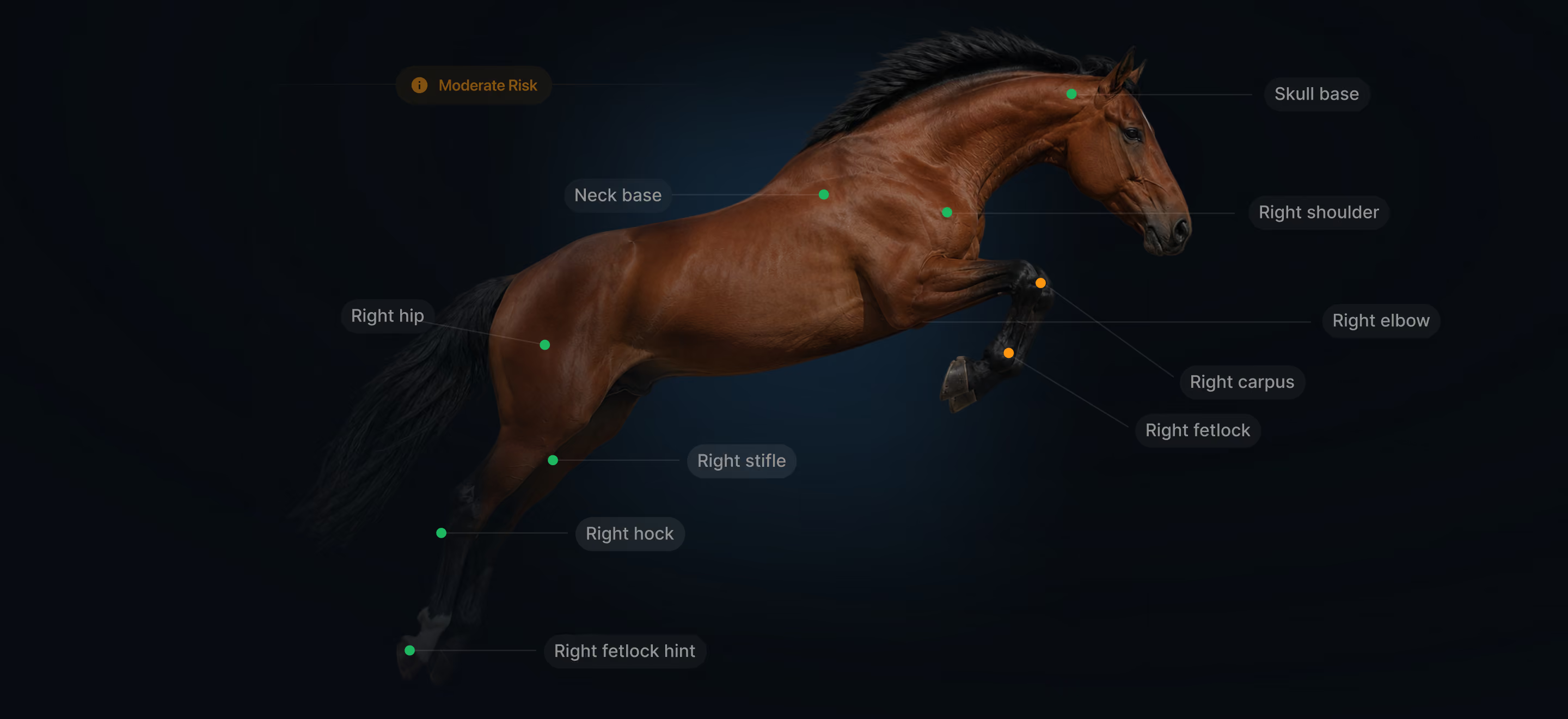
The heatmap visually highlights areas of the horse's body associated with elevated risk or recurring anomalies, helping trainers and vets identify patterns that may warrant closer attention.
Yes. The Trend tab on your horse profile lets you view performance across customisable date ranges — last week, last month, last 3 or 6 months, last year, or a fully custom range. You can also compare multiple horses side by side using the Compare feature.
The Phase Breakdown lets you review your horse's performance across each stage of a jump in detail: Approach, Flight, Intermediate/Combination, and Recovery. Each phase has its own metrics so you can pinpoint exactly where improvements are needed.
Yes. Tap Metrics Customisation on any session or horse analytics screen to adjust which metrics are displayed. Tap Reset Default to restore the original layout.
Managing Your Horses
Go to My Horses and tap the add button. You'll complete four steps:
Horse Identity — Name, date of birth, sex, breed, colour, country, height, weight, shoes, and biography
Registrations & IDs — Passport number, FEI number, UELN ID, and stable/yard location
Assigned Users — Primary rider and associated users (riders, trainers, vets, owners)
Media & Documents — Profile photo and any supporting documents
Yes. A horse can have a primary rider as well as other Riders, Trainers, Veterinarians, Horse Owners, and Enterprise members.
Open the horse profile and select the delete option. Note that this action is permanent — all video analysis data for that horse will be removed and cannot be recovered.
When a user adds or assigns your horse to their account, you'll receive a request in Pending Horse Requests. You can approve or decline it from there.
User Roles Explained
Riders are the primary users of the platform. They upload session videos, view performance analytics for their assigned horses, and track their progress over time.
Trainers are assigned to one or more horses and can view analytics and session data for those horses. They use StrydeUp to monitor performance trends and support their riders with data-driven coaching.
Vets assigned to a horse can access its performance data and heatmap to monitor biomechanical health, flag concerns, and support clinical decisions with objective movement data.
Horse Owners have visibility over their horse's profile, performance scores, and session history. They can be assigned to multiple horses and monitor overall wellbeing and performance.
Enterprise Admins are typically stable owners. They can invite and remove users, assign horses, manage roles, view all enterprise horses and sessions, and oversee billing and subscription usage across the platform.
Yes. You can hold different roles across different contexts — for example, you might be a Horse Owner on your individual account and a Rider within an enterprise. Your full role list is visible under My Roles in your profile.
Manage Your Organisation
Go to User Management and tap Invite User. Enter their full name, email address, phone number, address, and assign them a role. They'll receive an email invitation to join your enterprise.
Open the user's profile in User Management, tap Delete User, and confirm. This unassigns them from all horses and revokes enterprise access. You can re-invite them later if needed.
Your plan supports a maximum number of users. If you hit the limit, you'll see an alert. Tap Manage Plan to explore upgrade options, or contact our support team at info@strydeup.com— we'll help you find the right fit for your organisation.
Enterprise accounts use centralised billing, so all user access is managed under one subscription. View your current usage and next billing date at any time under My Subscription.
Account & Settings
Go to My Profile and tap Edit. You can update your name, email, address, and phone number. Changing your phone number will require a 6-digit verification code to confirm the new one before it's saved.
Go to Settings → Change Password. Enter your current password, then set and confirm your new one. Your password must be 8–15 characters and include at least one uppercase letter, one lowercase letter, one number, and one special character (@, $, %, &).
On the sign-in screen, tap Forgot Password?, enter your registered email address, and we'll send a verification code. Once verified, you can create a new password. If you can't access that email, contact us at info@strydeup.com
Go to Settings → Delete Account, enter your password to confirm, and tap Yes, Delete. This action is permanent and cannot be undone.
Go to Settings → Notification Settings. You can independently toggle push notifications, email notifications, and marketing notifications on or off.
Both are available under Settings → About & Legal. You can also access them during the sign-up flow.
You can reach our support team at support@strydeup.com, or via Settings → Help → Support within the app.